

What does it cost — and how long — to convert Access or Excel to a web app?
Last updated July 14, 2026
20+ years
Building business apps for small and mid-size companies.
Clear, up-front quotes
No surprise invoices. We scope, then quote the work.
Weekly progress updates
Progress updates every week. No black boxes.
Built on a modern React/Next.js + Node + SQL Server stack on AWS
How much does it cost to convert an Access database or Excel spreadsheet to a web app?
Most conversions start around $2,500 for a single spreadsheet or form and run into the low five figures for a multi-user Access system. A simple single-purpose spreadsheet is a small, quick project; a multi-module Access system with several users and integrations is a larger one. Every conversion is scoped and priced individually — YittBox reviews your specific system for free and gives you a fixed price up front, no hourly surprises.
How long does it take?
Most conversions take a few weeks to a few months — a single spreadsheet or form on the shorter end, a multi-user system with integrations on the longer end. Every project is RalphAI-accelerated, and you get the timeline in writing before we begin.
Typical project ranges
Every conversion is scoped and fixed-price quoted individually — but to give you a starting point, here’s where most projects land based on real work we’ve delivered.
Single spreadsheet or form
Starting around $2,500
One Excel workbook or a single Access form/report moved to a secure, multi-user web app for a small team.
Multi-form Access app
Typically $5,000–$15,000
A working Access database with several forms, reports and roles — cleaned up, made multi-user, and moved to the cloud.
Multi-module system
$20,000+
A larger system: many users, multiple modules, integrations (accounting, email, APIs) and data migration/cleanup.
Not sure where you fit? Send us your file — the free review comes back with a fixed price, so you never guess.
Our streamlined 6-step process
- 1
Free System Review
Async-first. Send us your files and we’ll analyze them — no charge. We tell you what we see and what it would take, then get back to you.
- 2
Architecture & quote
We write up the architecture, data model, and integrations — then quote the work up front. No surprises.
- 3
Iterative build with weekly progress updates
You get a progress update every week, so you can course-correct early and never wait months to see where things stand.
- 4
Data migration + parallel run
We migrate your data and run the old system alongside the new one until you’re confident.
- 5
UAT
Your team runs through the new app, tests the workflows that matter, and signs off before launch.
- 6
Go-live & ongoing support
We flip the switch, monitor the rollout, and stay on call. Support is ongoing — you’re not on your own day one.
What drives the scope
- number of tables/forms/reports
- logic complexity
- users & roles
- integrations
- data volume & cleanup
What you get
- multi-user access on any device
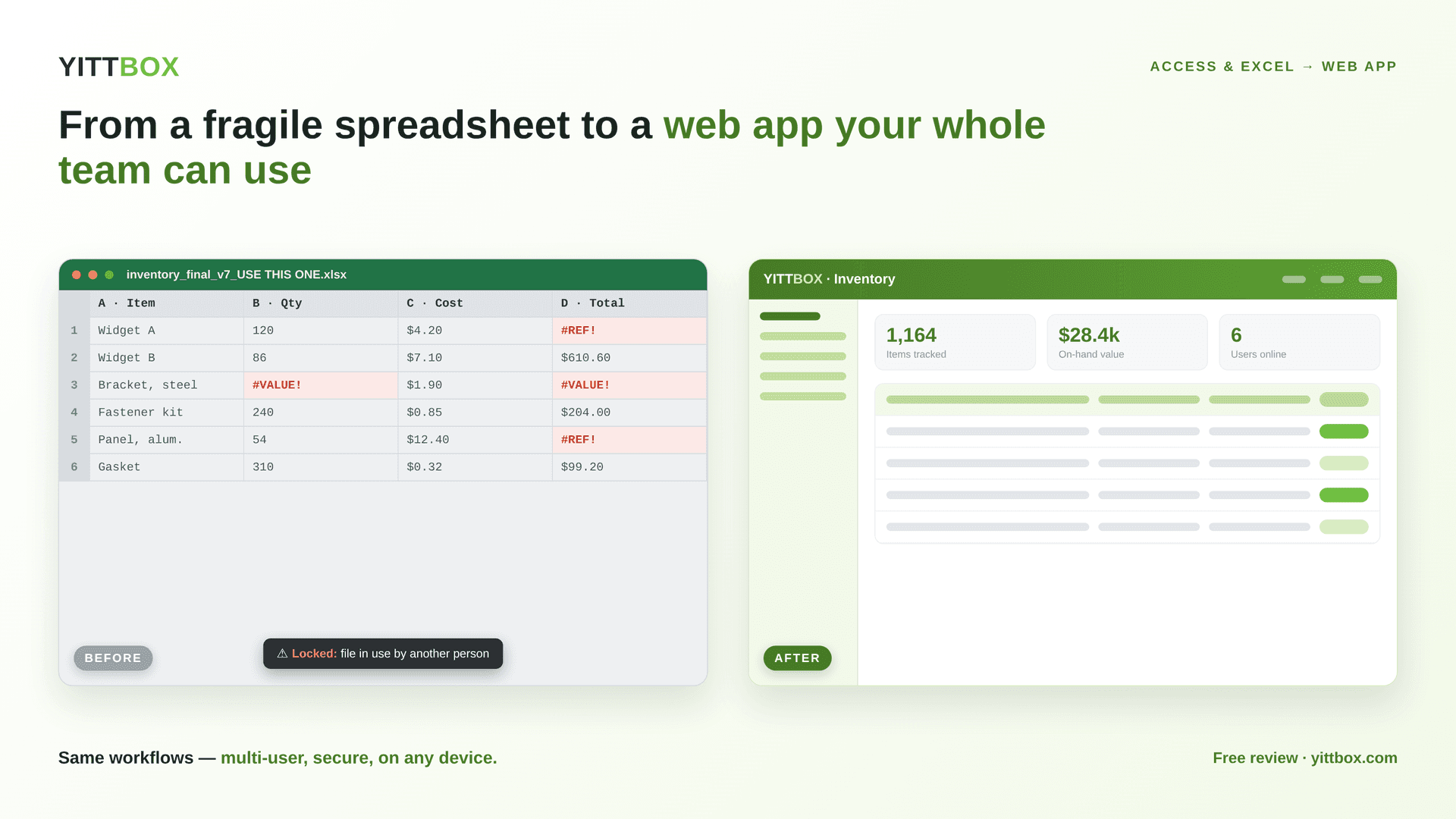
- no more file corruption or version conflicts
- permissions + audit trail
- configurable backups
- the same workflows your team already knows
How pricing works: free review → fixed up-front quote → no hourly surprises.
How a web app compares
| Capability | Access / Excel file | Custom web app |
|---|---|---|
| Access from anywhere | Tied to one PC / shared drive | Any browser, any device |
| Multiple users at once | File locks, lost edits | Real-time, no conflicts |
| Mobile / tablet | No | Built-in, responsive |
| Data integrity | Corrupts, version sprawl | One source of truth, configurable backups |
| Security | One shared file/password | Role-based logins + audit trail |
| Reporting & integrations | Manual, brittle | Live dashboards + API integrations |
| Scales as you grow | Hits size/row limits | Grows with your data + users |
What It Really Costs to Modernize Access/Excel
PDFAn honest breakdown of what Access/Excel modernization actually costs — the real price drivers and how to budget for your project.
What clients say
“The team is very skilled in MS Access and quickly turned around quality work. I recommend and would hire again!”
— Decisive BI, LLC
“We're an NYC not-for-profit law firm and hired the YittBox team to update our client management system and move it to Azure for remote access. The team was impeccable — their aptitude with Microsoft Access far exceeded my expectations. They get the highest marks across the board for communication and responsiveness. We'll continue to use them going forward.”
— CFAL
“Incredible. Simply put, the YittBox team exceeded our expectations at every step of the way on a very quick turnaround request. The solution they provided not only fit our specifications, but came tested, polished, with documentation, and was super-easy to use on our end. Highly recommended!”
— Full Spectrum Insights
What it costs to convert Access or Excel to a web app
There’s no single sticker price for converting a Microsoft Access database or an Excel spreadsheet into a web app, because a small, well-organized system and a sprawling one that’s grown for a decade are genuinely different jobs. What we can promise is a clear, up-front, no-call estimate with a defined scope and timeline — and a cost that typically lands well below buying and adapting off-the-shelf software for the same capability, with none of the per-seat licensing that keeps climbing as your team grows.
What drives the price
The main factors are how much logic the current system carries (the number of tables, forms, reports, and rules), how many users need access and at what permission levels, whether anything has to connect to other tools you already use, and how clean the existing data is. A spreadsheet with a few well-structured tabs converts quickly; an Access application with dozens of interlinked queries and years of ad-hoc changes takes more discovery up front.
How we quote it
Send us the file and we analyze it before quoting — so the estimate reflects your actual system, not a guess. You get a fixed scope, a timeline, and a price in writing, with no call required and no obligation. If the smart move is to phase the work — convert the highest-pain part first and grow from there — we’ll lay that out too.
More from the blog
Turn risky Access databases and sprawling Excel spreadsheets into secure, custom web apps.

June 30, 2026
Will We Lose Our Data When We Convert From Access or Excel?
It's the worry that stops a lot of teams from modernizing: what happens to years of records? Here's exactly how a safe conversion protects your data. Will we lo…
Read more →
June 30, 2026
Custom Web App vs No-Code (Airtable, Zoho, Power Apps): An Honest Comparison
No-code tools like Airtable, Zoho, and Power Apps are genuinely useful — but they're not always the right answer. Here's an honest comparison so you can pick th…
Read more →
June 30, 2026
How Do You Convert an Excel Spreadsheet Into a Web Application?
If a spreadsheet has quietly become the system your business runs on, the good news is you don't have to start over. Here's how turning it into a web applicatio…
Read more →Companies we've worked with
 UPA Diesel
 Nikz Nacks
 Rack N' Action
 1128 Capital
 VALLEY CAR GROUP
 GUIDELINE TEMPLATES
 ADVANCED CRM SOLUTIONS
 WAVERITAS
 BATES CUSTOM STONE
 SOUTHERN MISFITS OFF-ROADING
 TOP TOYS THIS YEAR
 PANN TV
 Media Choice
 M&A Associates
Our promise to you
Fixed up-front quote
Approve the price before any work starts — no surprise bills.
You own everything
You own 100% of your code and data. No lock-in.
We work until it's right
We keep at it until it does what we agreed on.
Free review, no commitment
Get a real answer with no call and no obligation.
Worried about handing over your data? See how we keep it safe →
Led by Joe & Holly, Managing Partners — meet the team →
Ready to see what your conversion would cost?
Send us your Access database or Excel spreadsheet for a free system review — we'll tell you what it takes and give you a fixed price up front.
Send us your filesNot sure what to expect? See how it works →